
Your photos, moving. Without opening a video editor.
Type your titles. Add your photos. Pick an effect. The tool records every video pin for you and hands them back in one ZIP, already branded and correctly sized.
You already know video pins are worth making. That is not the problem.
The problem is what making one actually involves.
Open an editor you use four times a year. Remember where the text tool is. Drag the photos onto a timeline, set the durations, find a font that is not the default, export, wait, discover it saved at the wrong size, export again. Forty minutes, for one pin, for one post.
So the video pin becomes the thing you will do later, and later never arrives. Meanwhile the still pins go out because those you can actually make.
Under a minute in the tool, no cuts
A real screen recording: pick an effect, paste three titles, drop in photos, press play on a pin, switch the text animation. Silent on purpose — the pins on the right are the real output.
Recorded at normal speed. Nothing sped up, nothing edited out. It plays on its own while it is on screen; press pause any time.
All 24 effects, playing right now.
Every video below came out of She Thrives Traffic in Motion exactly as you see it — recorded by the tool, untouched by any editor. Four of them used no photos at all.
Any photos
15 effectsWork with whatever photos you already use for still pins.No photos at all
4 effectsBought the tool this morning, no photo library yet? These post today.Paired photos
5 effectsNeed the same subject shot twice, or pieces shot separately.Videos play silently and loop, exactly as they will in a feed. Nothing on this page is mocked up.
Watch a whole batch record itself
Titles in, photos in, one button, and the batch records itself while you watch. Until the recording is live, everything above and below is the tool’s real output.
Four steps, and none of them is “learn a video editor”
Type your titles
One per line. One line becomes one video. Wrap any word in *asterisks* and it comes out in your accent colour.
Add your photos
Select them all at once. If you give it fewer photos than the effect needs, it cycles the ones you have rather than stopping.
Pick an effect
Choose one, or tick Vary effect per video and let the batch rotate through several automatically.
Download the batch
One button. Every video records in turn and arrives as a single ZIP, named and ready to upload.
Built for a whole post, not one pin
The same spreadsheet you already use
It reads the identical CSV as She Thrives Traffic — Title, Subtitle, CTA, URL, grouped by post. Load the file, pick which post you are working on, and every video takes its own wording from the sheet instead of you retyping it.
If you already have a pin list written, you already have your video list written.
Your colours, your font, your sizes
Set the background, text and accent colours once, choose from six fonts, and drag the title and subtitle sizes until they look like yours rather than like a template’s. Every video in the batch inherits it.
Pull a palette straight out of one of your own photos if you would rather not pick hex codes. And the text itself moves your way too — typed out, fading in, landing word by word, or simply there.
The cover frame is not a blank background
A video pin’s thumbnail is whatever its first frame happens to be, which for most tools is an empty screen before the animation starts. Here the first half-second shows the finished design, so the still people see before it plays is already a complete pin.
It is a small thing that decides whether anyone presses play.
This is the actual interface
Screenshots of the real thing, so nothing surprises you after you pay. Five small panels down the left, your previews on the right, one download button.
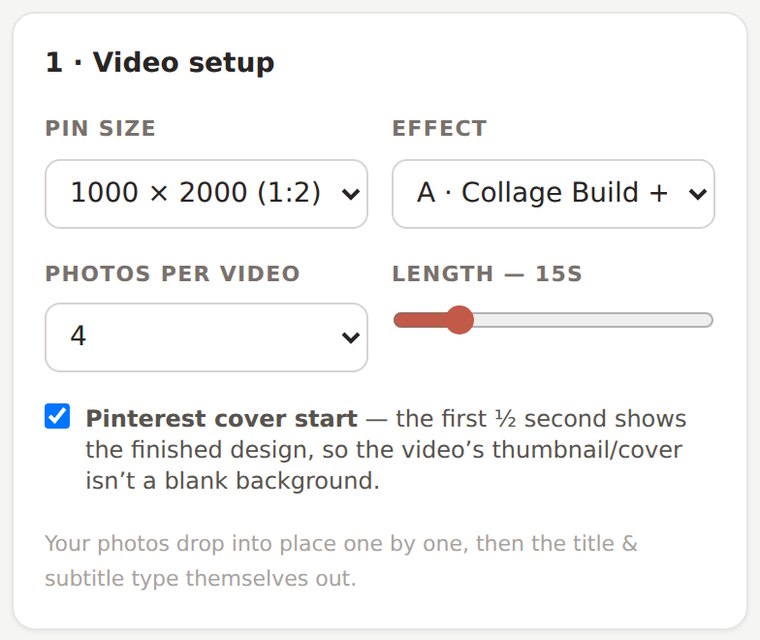
Pin size, effect, length — 5 to 60 seconds — and the cover-start switch. That is the whole setup.
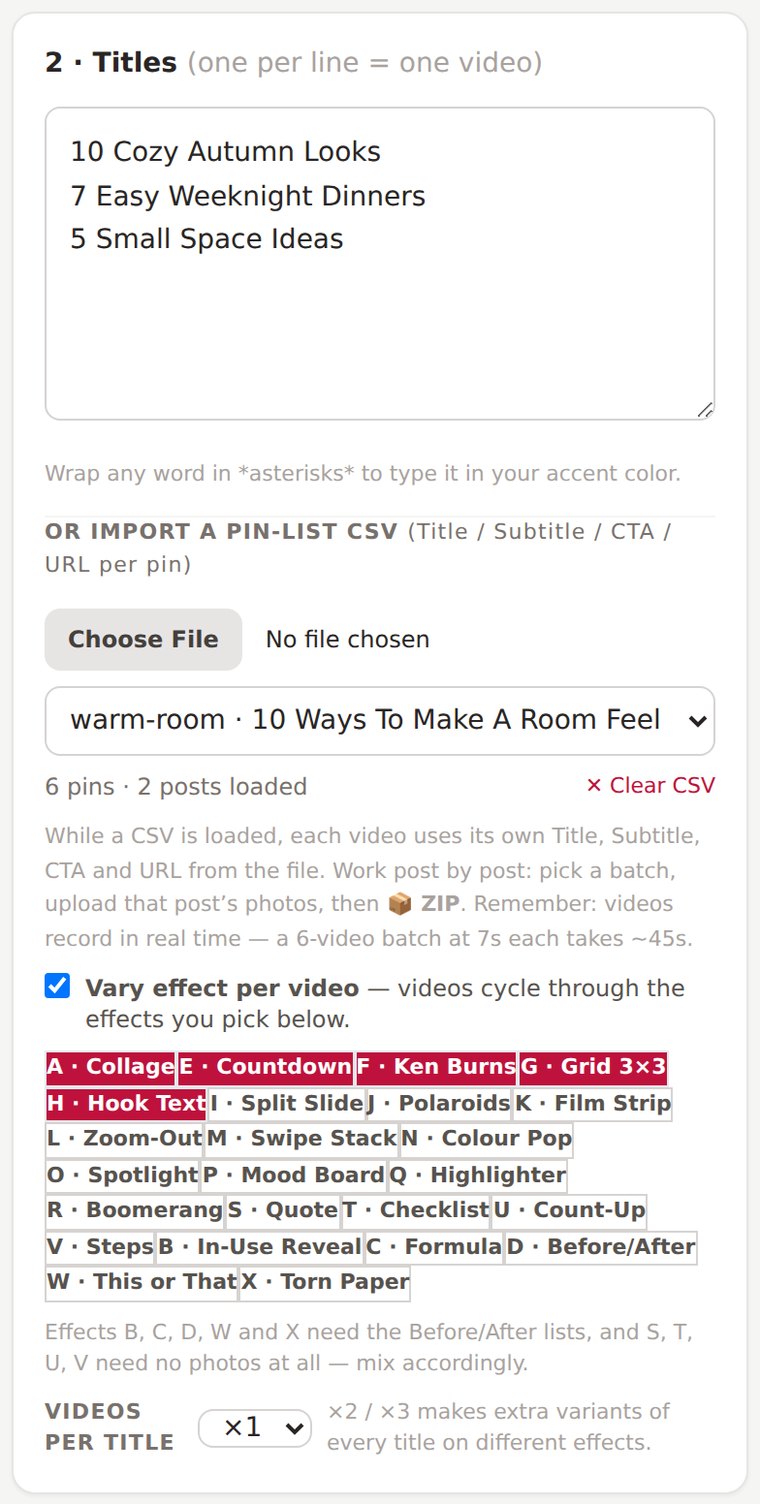
One line = one video, or load your pin-list CSV. Tick Vary effect per video and those are the 24 chips it rotates through.
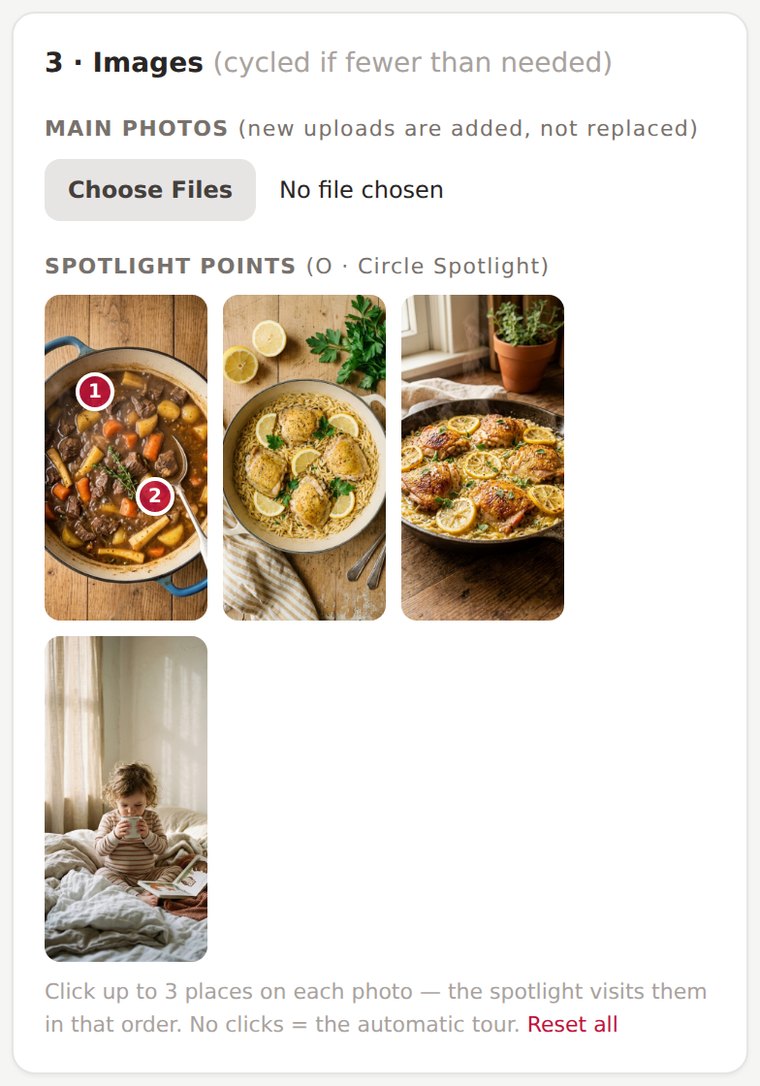
Photos go in here — and for Circle Spotlight, you click the exact places the spotlight should visit, in order.
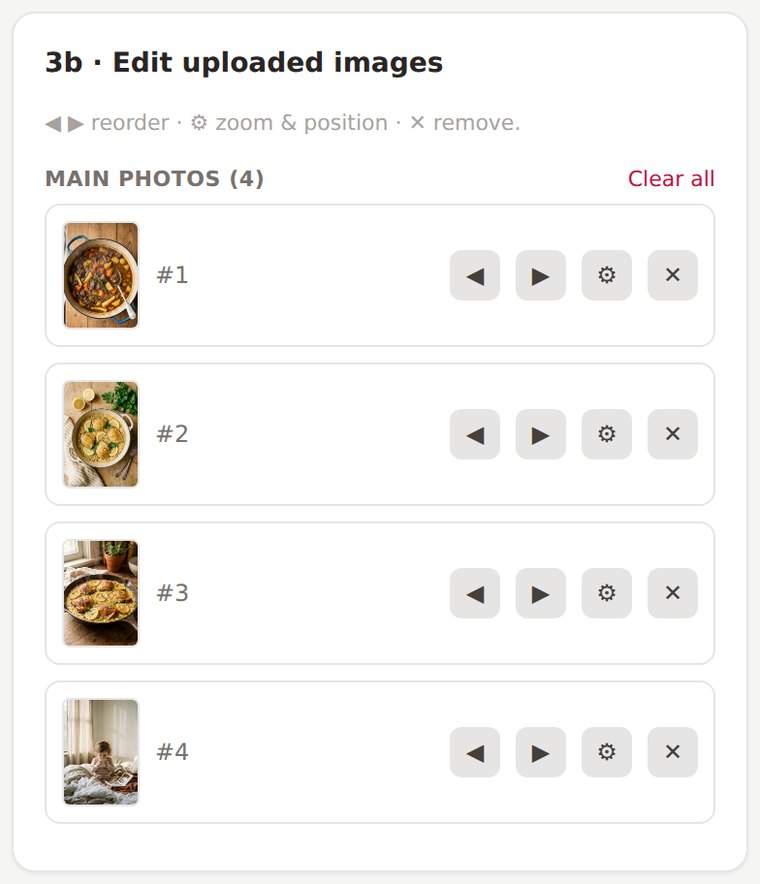
Every uploaded photo can be reordered, zoomed, repositioned or removed without re-uploading.
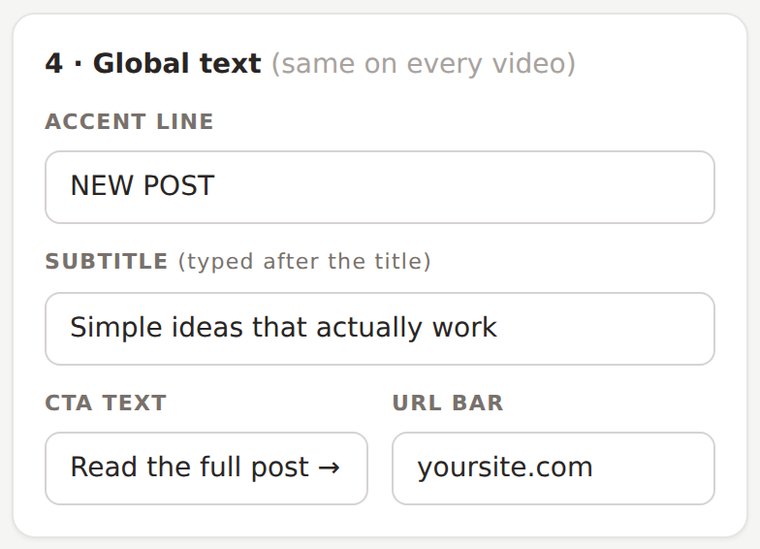
Accent line, subtitle, CTA, URL — set once, stamped on every video in the batch.
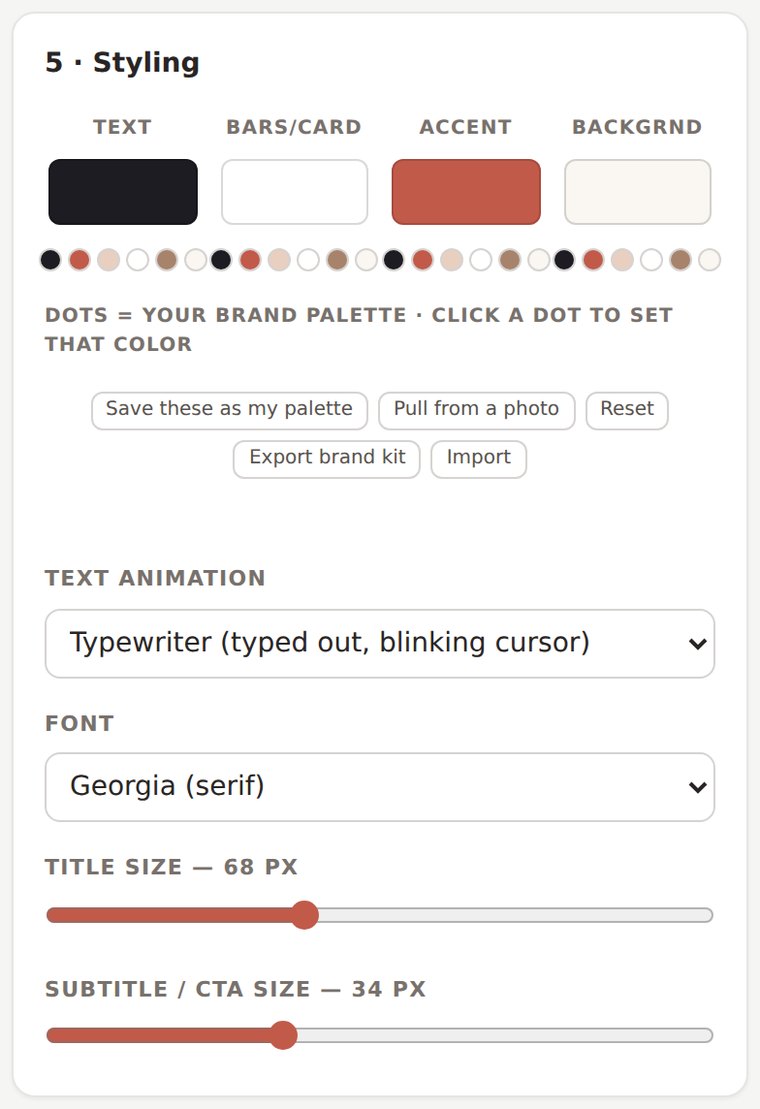
Your colours and font, the four text animations, and a brand kit you can save once and import into every She Thrives tool.
Four things I would rather you knew now
None of these will surprise you on day one if you read them today.
A seven-second pin takes seven seconds to make. A batch of six is about a minute, and the tab has to stay visible while it works or the browser pauses it. This is not slow software — it is how browsers record video. Put the kettle on rather than switching tabs.
Pinterest’s own guidance says fifteen to sixty seconds performs best, and the length slider covers that whole range. Short five-to-ten second loops are also a normal thing to post. Remember the trade: video records in real time, so a sixty-second pin takes sixty seconds to export.
The tool tests your browser first and uses MP4 whenever Chrome can encode it, which is most of the time. If yours cannot, you get WebM, and Pinterest wants MP4 — a free converter or your scheduler will flip it in seconds. Worth knowing before you plan a launch around it.
B, C, D, W and X only work if you have the same subject shot twice, or the pieces shot separately. Fifteen effects work with any photos you already have, and four need no photos at all. If you only have ordinary photos, you still have nineteen effects.
Who this is for
- You post to Pinterest regularly and want video in the mix without it costing an evening
- You have a back catalogue of posts and photos already sitting there
- You would rather own a tool once than rent one monthly
- You want your videos to look like yours, not like a template everyone else is using
- You are comfortable double-clicking an HTML file
- You need long-form video, voiceover, music or captions — this makes none of those
- You want to edit clips of footage; this animates still photographs
- You work only on a phone. It runs there, but selecting folders of photos and saving ZIPs is fiddly
- You want someone to make your pins for you. This is a tool, not a service
- You are looking for a Pinterest strategy course. This makes the files, not the plan
This is where buyer comments will go once there are real ones. Nothing invented sits here in the meantime — if you are reading this, you are early.
Buy it once. It is yours.
No subscription, no account, nothing to cancel. It runs on your computer, so it keeps working whatever happens to me.
- All 24 video effects, in three families
- Four text-only effects — post before you have photos
- 1000 × 1500 and 1000 × 2000 output
- Batch a whole post in one click
- CSV import, the same sheet as She Thrives Traffic
- Your colours, six fonts, your text sizes
- Four text animations — typewriter, fade & rise, word by word, instant
- Pinterest cover-start frame built in
- Runs offline, on your own computer
- Plain English guide, 5 ready-made spreadsheets and 7 AI prompts included
- Pin Schedule Planner included free — turns your pin list into a dated pinning calendar
- Free fixes, forever
If you are also getting She Thrives Traffic, the still-pin tool, do not buy it here. Add Traffic in Motion as a tick-box at that checkout and it is $30 instead of $49. Same file, same licence, $19 less. See She Thrives Traffic →
Three promises, in plain words
A file on your computer. No login, no licence server, no monthly fee. If this business disappeared tomorrow, the tool on your desktop would carry on working.
Your photos are never uploaded. Every video is recorded inside your own browser, which is also why it works on a train with no signal.
Email support@shethriveslab.com — or reply to your purchase email — and say what you clicked, what you expected and what happened instead. If it is a bug I fix it and send you the new file, free, however long after you bought it.
The ones worth answering
Do I need to know how to edit video?
No, and there is nothing to learn. There is no timeline, no keyframes and no export settings. You type words, choose photos, pick an effect from a list and press one button.
What do I actually receive?
A single HTML file you double-click, a plain English guide, and the CSV templates. It opens in Chrome, Edge, Firefox or Safari. There is nothing to install and no account to make.
How many videos can I make at once?
As many titles as you paste in. The practical limit is time rather than the tool: videos record in real time, so a batch of ten at seven seconds each takes a little over a minute plus a moment to pack the ZIP.
Will it work on my Mac / my PC / my phone?
It runs anywhere with a modern browser, and Chrome gives the most reliable MP4 recording. It does work on a phone or tablet, but choosing folders of photos and saving ZIPs is fiddly on mobile — use a computer to make a real batch.
How is this different from She Thrives Traffic?
She Thrives Traffic makes still image pins, 39 layouts, hundreds at a time. Traffic in Motion is its moving half — same family, same spreadsheet, animated output. They share the CSV format and the way they handle brand colours, so they work well side by side, but each is a separate file and a separate purchase.
Can I use the videos for client work?
Yes. You may use everything you make in your own business and for clients you are paid by. What you may not do is pass on or resell the tool file itself. The full licence comes with it.
Do I need to supply the photos?
Yes — the tool animates your photographs, it does not generate them. Any photos you already use for pins will work.
What if I buy it and it is not what I thought?
Because it is an instant download, it is not returnable once you have it — that is stated at checkout before you pay, and it is why this page is as blunt as it is about what the tool does not do. If something is broken, that is different: tell me and I will fix it.
The video pins you keep meaning to make
You have the photos. You have the post titles. What you have never had is an afternoon spare to sit in an editor. This is the tool that removes the afternoon.
Get Traffic in Motion — $49