
Your pins, posting themselves.
A short course that turns the pins your She Thrives tools make into a steady daily drip on Pinterest — with one spreadsheet, one small free automation on Make.com, and a forty-minute refill once a month. No scheduler subscription. Seven modules, one evening to read, yours to keep.
Get Pin Autopilot — $39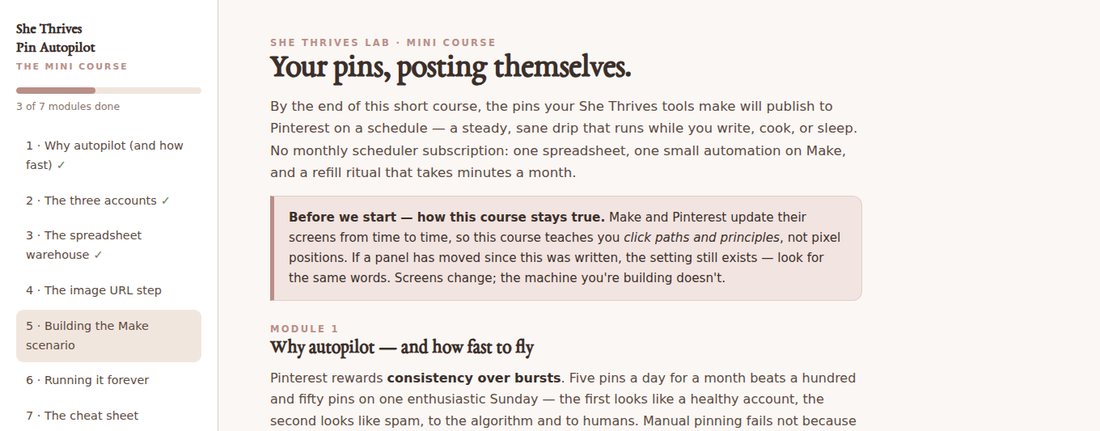
Seven short modules. One machine you’ll own.
Not a video library that goes stale — an interactive page that lives on your computer, remembers where you got to, and teaches click paths and principles that survive every redesign of Make and Pinterest.
Seven modules, in the order you’ll do them
Each one ends with something built, not just something read. About 2,300 words in total — an evening to read, a weekend to have it running.
Why autopilot — and how fast to fly
The case for a steady drip over bursts, and the pacing rules the whole course is built on.
The three accounts
What to set up before anything else, and the operations maths behind Make’s free tier, worked honestly.
The spreadsheet warehouse
The one sheet that holds every pin you will ever post, what each column does, and how to fill it straight from your She Thrives tools.
The image-URL step where everyone gets stuck
Pin images have to live at a public web address. Three ways to do it, one recommended, one warned against — given a whole module because it is where people give up.
Building the Make scenario
The three-block automation, built with you step by numbered step, with “you should now see” checkpoints, a test run, and what to do if the test fails.
Running it forever
Switching it on, the monthly refill ritual, and how to read the gauges so you notice a problem before Pinterest does.
The cheat sheet
The whole system on one printable page: the machine, the sheet columns, the rules, the monthly ritual, and what to check when it breaks.
Text and checkpoints, no video — on purpose. Screens change; the words you are told to look for do not.
A warehouse, a drip, a refill ritual
The warehouse
One Google Sheet holds every pin your tools export — title, description, link, image URL, and a Status column. Row order is your calendar.
The drip
A three-block Make scenario wakes a few times a day, takes the topmost READY row, publishes it to Pinterest, and marks it POSTED. One pin per run — a rhythm, never a flood.
The refill
Once a month: run a CSV through your tools, host the images, paste the new rows, mark them READY. About forty minutes, then it runs itself again.
Four things I would rather you knew now
A Pinterest business account (a free conversion), a free Make.com account, and a Google account. Pin images must live at public web addresses — your own blog’s media library is the recommended route, and Module 4 covers the options honestly, including why Google Drive isn’t one of them.
The course shows the operations maths against typical allowances, then tells you to check Make’s current pricing page rather than trust any course — including this one. Platforms change their numbers; the course refuses to pretend otherwise.
Software screens change; videos of them rot. The course teaches click paths and principles that survive redesigns, with “you should now see” checkpoints instead of pause-and-rewind. The one screenshot on this page is of the course file itself; the rest of it stays inside the course, where you paid for it to be.
A few pins a day, spread out, fresh images first. The course deliberately does not teach mass-pinning, loops, or anything that games engagement — those tactics burn Pinterest accounts, and no sale is worth teaching you one.
Learn it once. It runs for years.
- The interactive seven-module course — one HTML file, offline, progress saved
- The warehouse spreadsheet template, ready to import
- The exact Make scenario recipe, setting by setting
- The printable cheat sheet — the whole system on one page
- Pacing rules that protect your Pinterest account
- Free updates — when platforms shift, the course is corrected and re-sent
Pin Autopilot is the last mile of the Lab: the tools make the pins, the packs and Blog Boxes fill them, and this course makes them post themselves. It works with the exports of every She Thrives pin tool — and with any pin images you make anywhere else, too.
The ones worth answering
Do I need to know anything technical?
If you can use a spreadsheet and follow numbered steps, you can build this. The automation is three connected blocks with a filter — the course builds it with you, checkpoint by checkpoint, and the troubleshooting section covers the ways it typically goes wrong.
How long does it take?
About an evening to read all seven modules, and a weekend to have the machine running — most of that is the image-hosting step and waiting for the first test pin to appear. After that, roughly forty minutes a month.
Why no video?
Because Make and Pinterest redesign their screens, and a video of last year’s interface reads as a broken product. Text steps that teach the words to look for survive redesigns and get corrected in minutes when platforms shift — and as a buyer you receive those corrections free.
Will this get my Pinterest account in trouble?
The whole course is built around the opposite: a slow, spread-out drip of fresh pins, using Pinterest’s own supported connection. What burns accounts is flooding and looping — which the course explicitly teaches against. Follow the pacing rules and you are behaving better than most manual pinners.
Does it only work with She Thrives tools?
No — the warehouse takes any pin: title, description, link, image URL. It is simply fastest with the Lab tools, whose CSV exports map onto the sheet almost column for column.
What if Make changes its interface or pricing?
The course teaches principles and click paths, flags every number as “verify the current page”, and gets corrected and re-sent to buyers when something material shifts. That is the honest deal with any course about someone else’s platform — stated here rather than discovered later.
Refunds?
None — it is an instant download of the actual course, so the moment you pay it is in your hands. That is why this page lists every chapter and what each one leaves you with, so you know exactly what you are buying. Duplicate charges are refunded immediately.